Magnetic Smart Trifold Slim Cover for iPad Pro 3 | Pro 4 | Pro 5 M1 | Pro 6 M2 (12.9-inch)
-
Estimated Delivery:Mar 20 - Mar 24
-
Fast Shipping & Returns T&C apply
The Trifold Smart Cover for iPad is a slim-fit, full-body protective case with auto sleep & wake functionality and a handy desk stand. As well as protecting the edges, corners and the screen, the front cover of the case can be folded back to form an ingenious stand. The rollout stands feature enables you to position your iPad tablet in a typing position as well as stand it upright to comfortably watch movies and browse the Internet.
- Slim and lightweight design.
- Sleep/wake sensor for an automatic open and close screen on/off function. Access to all ports, buttons, and camera features.
- Microfibre interior lining keeps your screen clean.
- The front cover folds back on itself to create a kickstand.
- Multiple viewing angles for hands-free content consumption.
- Perfect for business users and travelers.
Engineered for professionals on the move, this magnetic smart trifold cover combines minimalist aesthetics with intelligent functionality. The integrated sleep/wake sensor automatically powers your display on and off, while the slim, lightweight construction ensures effortless portability. Microfibre interior lining safeguards your screen from scratches and dust. Full access to all ports, buttons, and cameras remains uncompromised. The innovative front cover folds back seamlessly to form a stable kickstand, offering multiple viewing angles for presentations, video calls, and content consumption. Ideal for business users and frequent travelers seeking reliable protection without bulk.
This magnetic smart trifold cover combines professional-grade protection with intelligent functionality for your iPad Pro 3 | Pro 4 | Pro 5 M1 | Pro 6 M2 (12.9-inch). The slim, lightweight construction maintains portability without compromising durability. An integrated sleep/wake sensor automatically powers your screen on and off as you open and close the cover, extending battery life. The microfibre interior lining safeguards your display from scratches and dust. Featuring a foldable front cover that doubles as a versatile kickstand, it supports multiple viewing angles for presentations, video calls, and media consumption. Full access to all ports, buttons, and cameras ensures seamless connectivity. Engineered for professionals and frequent travelers who demand both style and substance.
Sleep/wake sensor for an automatic open and close screen on/off function. Access to all ports, buttons, and camera features.
| Condition | New |
| Available | In Stock |
| Seller | Ktusu |
| Product Id | 8045503479908 |
| Compatiable Brand | Apple |
| Compatiable Device | iPad |
| Compatiable Model | Apple iPad Pro 3 (2018-2020) (12.9-inch), Apple iPad Pro 4 (2020-2021) (12.9-inch), Apple iPad Pro 5 M1 (2021-2022) (12.9-inch), and Apple iPad Pro 6 M2 (2022-2024) (12.9-inch) |
| Category | E-Book Reader Cases |
| Style | Kickstand and Premium |
| Colors / Patterns | Black, Blue, Green, Pink, and Grey |
| Case Type | Shell cover, Stand, and Back cover |
| Bag & Case Material | Silicone, Faux leather, Plastic, Polycarbonate, and Thermoplastic polyurethane (TPU) |

Magnetic Smart Trifold Slim Cover for iPad Pro 3 | Pro 4 | Pro 5 M1 | Pro 6 M2 (12.9-inch)
Which iPad Do I Have?
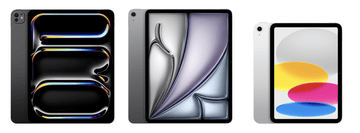
By Model Numbers
Identifying your iPad
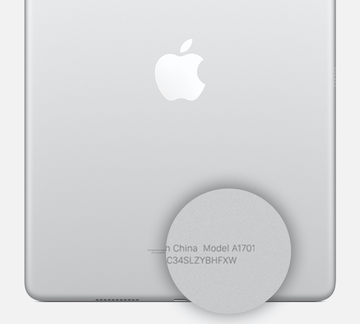
iPad model numbers are often found on the underside, making identification quick and easy.
| iPad | Year | Model Number |
|---|---|---|
| iPad Pro 13-inch (M4) | 2024 | A2925, A2926, A3007 |
| iPad Pro 11-inch (M4) | 2024 | A2836, A2837, A3006 |
| iPad Pro 12.9-inch (6th generation) | 2022 | A2436, A2437, A2764, A2766 |
| iPad Pro 11-inch (4th generation) | 2022 | A2759, A2761, A2435, A2762 |
| iPad Pro 12.9-inch (5th generation) | 2021 | A2378, A2461, A2379, A2462 |
| iPad Pro 11-inch (3rd generation) | 2021 | A2377, A2459, A2301, A2460 |
| iPad Pro 12.9-inch (4th generation) | 2020 | A2229, A2069, A2232, A2233 |
| iPad Pro 11-inch (2nd generation) | 2022 | A2228, A2068, A2230, A2231 |
| iPad Pro 12.9-inch (3rd generation) | 2018 | A1876, A2014, A1895, A1983 |
| iPad Pro 11-inch | 2018 | A1980, A2013, A1934, A1979 |
| iPad Pro 12.9-inch (2nd generation) | 2017 | A1670, A1671, A1821 |
| iPad Pro (10.5-inch) | 2017 | A1701, A1709, A1852 |
| iPad Pro (9.7-inch) | 2016 | A1673, A1674, A1675 |
| iPad Pro (12.9-inch) | 2015 | A1584 , A1652 |
| iPad Air 13-inch (M2) | 2024 | A2898, A2899, A2900 |
| iPad Air 11-inch (M2) | 2024 | A2902, A2903, A2904 |
| iPad Air 10.9-inch (5th generation) | 2022 | A2588, A2589, A2591 |
| iPad Air 10.9-inch (4th generation) | 2020 | A2316, A2324, A2325, A2072 |
| iPad Air 10.5-inch (3rd generation) | 2019 | A2152, A2123, A2153, A2154 |
| iPad Air 2 (9.7-inch) | 2014 | A1566, A1567 |
| iPad Air 9.7-inch | 2013 | A1474, A1475, A1476 |
| iPad mini 8.3-inch (6th generation) | 2021 | A2567, A2568, A2569 |
| iPad mini 7.9-inch (5th generation) | 2019 | A2133, A2124, A2126, A2125 |
| iPad mini 4 (7.9-inch) | 2015 | A1538, A1550 |
| iPad mini 3 (7.9-inch) | Late 2014 | A1599, A1600 |
| iPad mini 2 (7.9-inch) | Late 2013 and early 2014 | A1489, A1490, A1491 |
| iPad mini 7.9-inch | Late 2012 | A1432, A1454, A1455 |
| iPad 10.9-inch (10th generation) | 2022 | A2696, A2757, A2777, A3162 |
| iPad 10.2-inch (9th generation) | 2021 | A2602, A2604, A2603, A2605 |
| iPad 10.2-inch (8th generation) | 2020 | A2270, A2428, A2429, A2430 |
| iPad 10.2-inch (7th generation) | 2019 | A2197, A2200, A2198 |
| iPad 9.7-inch (6th generation) | 2018 | A1893, A1954 |
| iPad 9.7-inch (5th generation) | 2017 | A1822, A1823 |
| iPad 9.7-inch (4th generation) | Late 2012 | A1458, A1459, A1460 |
| iPad 9.7-inch (3rd generation) | Early 2012 | A1416, A1430, A1403 |
| iPad 2 (9.7-inch) | 2011 | A1395, A1396, A1397 |
| iPad (9.7-inch) | 2010 | A1219, A1337 |
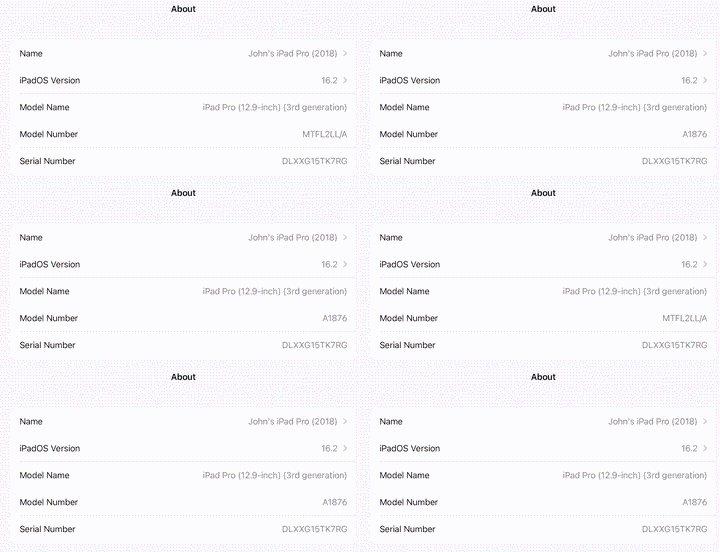
Identifying your iPad Using "About iPad"
An alternative way to find out which iPad you have is by using the
Open Settings, tap General, then tap About. Look for the model number in
the top section. If the number you see has a slash "/", that's the part
number (for example, MY3K2LL/A). Tap the part number to reveal the
model number, which has a letter followed by four numbers and no slash
(for example, A2342).