Multifold Leather Texture Magnetic Smart Folio Cover for iPad Air 4/5 | Air 11 M2/M3
-
Estimated Delivery:Jun 12 - Jun 16
-
Fast Shipping & Returns T&C apply
Strong Magnetic Adsorption: Features strong magnets that securely hold your tablet in place, ensuring it stays attached to the case.
Portable & Foldable Stand: The foldable design allows you to easily convert the case into a stand, providing hands-free viewing at multiple angles.
perfect for tablet users who value both style and functionality. Its combination of strong magnetic adsorption, lightweight design, and foldable stand makes it an essential accessory for work, entertainment, or travel.
Premium Materialls: Made from high-quality PU leather, TPU, and a transparent acrylic inner case, ensuring durability and long-lasting use
Sleek Design: Simple and elegant pure color design, available in multiple color options to suit your style
Precise Cutouts: Allows easy access to all essential ports and buttons with accurately positioned cutouts
This premium smart folio combines sophisticated leather-textured design with practical engineering for iPad Air 4/5 | Air 11 M2/M3 users. Powerful embedded magnets provide secure, reliable tablet attachment while the innovative multifold mechanism transforms your case into a versatile stand supporting multiple viewing angles. Whether you're working at your desk, streaming content, or traveling, this lightweight accessory delivers professional-grade protection without bulk. The seamless integration of magnetic technology and adjustable positioning makes it an indispensable companion for productivity and entertainment, offering both aesthetic appeal and everyday functionality.
Slim Shell Case at all times! The Slim Shell Case supports a simple and classy design,The back shell is made from durable polycarbonate material so you do not need to worry about any damage, It offers an easy snap-on application. Because the cover is uniquely designed to flip back and transform the case into a comfortable viewing stand that offers four different viewing angles,
this capability allows the viewer to use the new iPad hands-free whatever your position may be without strain whether it is being used for viewing or for a keypad, All features of the new iPad are accessible even with the case on,It even includes a camera hole so you can take pictures and videos without removing it.
Features strong magnets that securely hold your tablet in place, ensuring it stays attached to the case.
| Condition | New |
| Available | In Stock |
| Seller | Ktusu |
| SKU | KTSUPUIYJ |
| Compatiable Brand | Apple |
| Compatiable Device | iPad |
| Compatiable Model | Apple iPad Air 4 (2020) (10.9-inch), Apple iPad Air 5 M1 (2022) (10.9-inch), Apple iPad Air 6 M2 (2024-2025) (11-inch), and Apple iPad Air 7 M3 (2025) (11-inch) |
| Category | E-Book Reader Cases |
| Style | Kickstand, Premium, Magnetic, and Flip |
| Colors / Patterns | Black, Sierra Blue, Light Grey, Off White, and Pink |
| Case Type | Flip, Back cover, Stand, Shell cover, and Folio |
| Bag & Case Material | Faux leather, Thermoplastic polyurethane (TPU), Acrylic, and Plastic |

Multifold Leather Texture Magnetic Smart Folio Cover for iPad Air 4/5 | Air 11 M2/M3
Which iPad Do I Have?
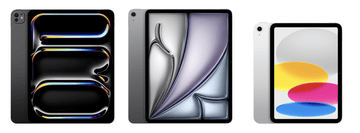
By Model Numbers
Identifying your iPad
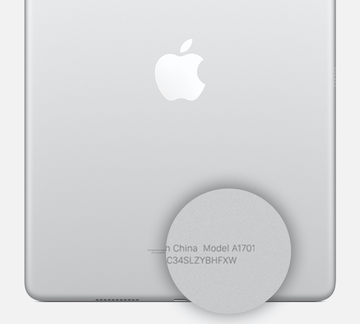
iPad model numbers are often found on the underside, making identification quick and easy.
| iPad | Year | Model Number |
|---|---|---|
| iPad Pro 13-inch (M4) | 2024 | A2925, A2926, A3007 |
| iPad Pro 11-inch (M4) | 2024 | A2836, A2837, A3006 |
| iPad Pro 12.9-inch (6th generation) | 2022 | A2436, A2437, A2764, A2766 |
| iPad Pro 11-inch (4th generation) | 2022 | A2759, A2761, A2435, A2762 |
| iPad Pro 12.9-inch (5th generation) | 2021 | A2378, A2461, A2379, A2462 |
| iPad Pro 11-inch (3rd generation) | 2021 | A2377, A2459, A2301, A2460 |
| iPad Pro 12.9-inch (4th generation) | 2020 | A2229, A2069, A2232, A2233 |
| iPad Pro 11-inch (2nd generation) | 2022 | A2228, A2068, A2230, A2231 |
| iPad Pro 12.9-inch (3rd generation) | 2018 | A1876, A2014, A1895, A1983 |
| iPad Pro 11-inch | 2018 | A1980, A2013, A1934, A1979 |
| iPad Pro 12.9-inch (2nd generation) | 2017 | A1670, A1671, A1821 |
| iPad Pro (10.5-inch) | 2017 | A1701, A1709, A1852 |
| iPad Pro (9.7-inch) | 2016 | A1673, A1674, A1675 |
| iPad Pro (12.9-inch) | 2015 | A1584 , A1652 |
| iPad Air 13-inch (M2) | 2024 | A2898, A2899, A2900 |
| iPad Air 11-inch (M2) | 2024 | A2902, A2903, A2904 |
| iPad Air 10.9-inch (5th generation) | 2022 | A2588, A2589, A2591 |
| iPad Air 10.9-inch (4th generation) | 2020 | A2316, A2324, A2325, A2072 |
| iPad Air 10.5-inch (3rd generation) | 2019 | A2152, A2123, A2153, A2154 |
| iPad Air 2 (9.7-inch) | 2014 | A1566, A1567 |
| iPad Air 9.7-inch | 2013 | A1474, A1475, A1476 |
| iPad mini 8.3-inch (6th generation) | 2021 | A2567, A2568, A2569 |
| iPad mini 7.9-inch (5th generation) | 2019 | A2133, A2124, A2126, A2125 |
| iPad mini 4 (7.9-inch) | 2015 | A1538, A1550 |
| iPad mini 3 (7.9-inch) | Late 2014 | A1599, A1600 |
| iPad mini 2 (7.9-inch) | Late 2013 and early 2014 | A1489, A1490, A1491 |
| iPad mini 7.9-inch | Late 2012 | A1432, A1454, A1455 |
| iPad 10.9-inch (10th generation) | 2022 | A2696, A2757, A2777, A3162 |
| iPad 10.2-inch (9th generation) | 2021 | A2602, A2604, A2603, A2605 |
| iPad 10.2-inch (8th generation) | 2020 | A2270, A2428, A2429, A2430 |
| iPad 10.2-inch (7th generation) | 2019 | A2197, A2200, A2198 |
| iPad 9.7-inch (6th generation) | 2018 | A1893, A1954 |
| iPad 9.7-inch (5th generation) | 2017 | A1822, A1823 |
| iPad 9.7-inch (4th generation) | Late 2012 | A1458, A1459, A1460 |
| iPad 9.7-inch (3rd generation) | Early 2012 | A1416, A1430, A1403 |
| iPad 2 (9.7-inch) | 2011 | A1395, A1396, A1397 |
| iPad (9.7-inch) | 2010 | A1219, A1337 |
Identifying your iPad Using "About iPad"
An alternative way to find out which iPad you have is by using the
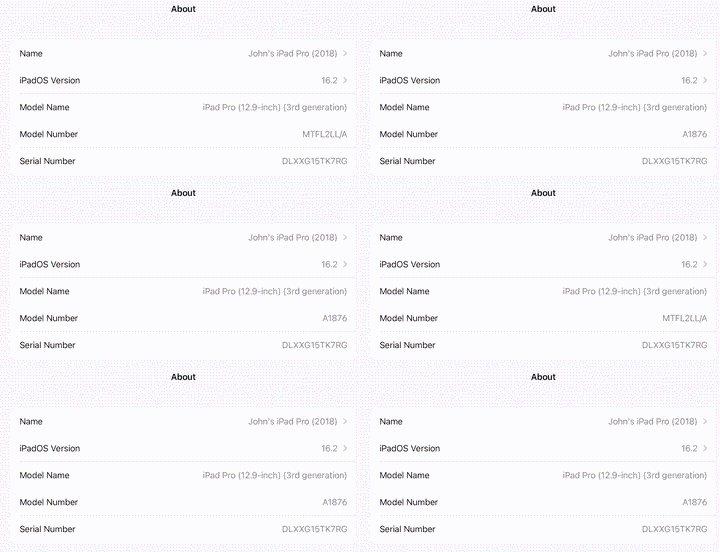
Open Settings, tap General, then tap About. Look for the model number in
the top section. If the number you see has a slash "/", that's the part
number (for example, MY3K2LL/A). Tap the part number to reveal the
model number, which has a letter followed by four numbers and no slash
(for example, A2342).