NILLKIN Bumper Backlit Keyboard Cover for iPad Pro 11 (2024)
-
Estimated Delivery:Oct 21 - Oct 25
-
Fast Shipping & Returns T&C apply
NILLKIN Bluetooth Touch Keyboard Smart Tablet Case for Apple iPad
Specification:
- Sliding Camera Cover Design, protect your camera and privacy.
- The Case and keyboard can be detached and used separately.
- Adjustable Kickstand, suitable for difference height of people to use, helps relieve cervical vertebra pressure.
- Scissor mechanism design, more comfortable to tying on.
- Smart trackpad, support multiple of gestures to quick operation table, working efficient.
- Smart sleep, save energy without power consumption.
- Built-in pen slot, storage does not affect charging.
- Built-in large-capacity battery, long battery life.
- Adopt dual-core processor, stable Bluetooth connection, up to 120Hz touch
- sampling rate, make the operation smoother and more sensitive, support various multi-point painstaking and quick gestures, no need to frequently raise your hand to touch the screen.
Parameters:
- Bluetooth version: 3.0
- Effective operating range: within 10 meters
- Modulation: GFSK
- Input voltage: 5V
- Input current: 2A
- Charging time: 2.5 hours
- Standby time: more than 180 days
- Lithium battery capacity: 500mAh
- Working time: Backlit mode 14h, non backlit mode 100h
The Case and keyboard can be detached and used separately. Adjustable Kickstand, suitable for difference height of people to use, helps relieve cervical vertebra pressure.
| Condition | New |
| Available | In Stock |
| Seller | Ktusu |
| SKU | KTSU95PFL |
| Compatiable Brand | Apple |
| Compatiable Device | iPad |
| Compatiable Model | Apple iPad Pro 5 M4 (2024) (11-inch) |
| Category | Tablet Computer Back Covers |
| Style | Premium and Cover With Keyboard |
| Colors / Patterns | Black |
| Case Type | Flip, Shell cover, and Stand |
| Bag & Case Material | Thermoplastic polyurethane (TPU), Polycarbonate, and Faux leather |

NILLKIN Bumper Backlit Keyboard Cover for iPad Pro 11 (2024)
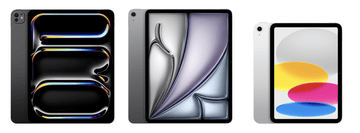
Which iPad Do I Have?
By Model Numbers
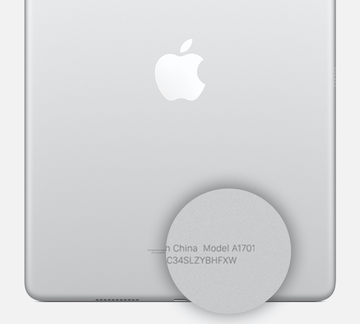
Identifying your iPad
iPad model numbers are often found on the underside, making identification quick and easy.
| iPad | Year | Model Number |
|---|---|---|
| iPad Pro 13-inch (M5) | 2025 | A3360, A3361, A3362 |
| iPad Pro 13-inch (M4) | 2024 | A2925, A2926, A3007 |
| iPad Pro 12.9-inch (6th generation) | 2022 | A2436, A2437, A2764, A2766 |
| iPad Pro 12.9-inch (5th generation) | 2021 | A2378, A2461, A2379, A2462 |
| iPad Pro 12.9-inch (4th generation) | 2020 | A2229, A2069, A2232, A2233 |
| iPad Pro 12.9-inch (3rd generation) | 2018 | A1876, A2014, A1895, A1983 |
| iPad Pro 12.9-inch (2nd generation) | 2017 | A1670, A1671, A1821 |
| iPad Pro 11-inch (M5) | 2025 | A3357, A3358, A3359 |
| iPad Pro 11-inch (M4) | 2024 | A2836, A2837, A3006 |
| iPad Pro 11-inch (4th generation) | 2022 | A2759, A2761, A2435, A2762 |
| iPad Pro 11-inch (3rd generation) | 2021 | A2377, A2459, A2301, A2460 |
| iPad Pro 11-inch (2nd generation) | 2020 | A2228, A2068, A2230, A2231 |
| iPad Pro 11-inch | 2018 | A1980, A2013, A1934, A1979 |
| iPad Pro (9.7-inch) | 2016 | A1673, A1674, A1675 |
| iPad Pro (12.9-inch) | 2015 | A1584 , A1652 |
| iPad Pro (10.5-inch) | 2017 | A1701, A1709, A1852 |
| iPad Air 13-inch (M4) | 2026 | A3461, A3462, A3464 |
| iPad Air 11‑inch (M4) | 2026 | A3459, A3460, A3463 |
| iPad Air 13-inch (M3) | 2025 | A3268, A3269, A3271 |
| iPad Air 11-inch (M3) | 2025 | A3266, A3266, A3270 |
| iPad Air 13-inch (M2) | 2024 | A2898, A2899, A2900 |
| iPad Air 11-inch (M2) | 2024 | A2902, A2903, A2904 |
| iPad Air 10.9-inch (5th generation) | 2022 | A2588, A2589, A2591 |
| iPad Air 10.9-inch (4th generation) | 2020 | A2316, A2324, A2325, A2072 |
| iPad Air 10.5-inch (3rd generation) | 2019 | A2152, A2123, A2153, A2154 |
| iPad Air 2 (9.7-inch) | 2014 | A1566, A1567 |
| iPad Air 9.7-inch | Late 2013 and early 2014 | A1474, A1475, A1476 |
| iPad mini (A17 Pro) 8.3 inch | 2024 | A2993, A2995, A2996 |
| iPad mini 8.3-inch (6th generation) | 2021 | A2567, A2568, A2569 |
| iPad mini 7.9-inch (5th generation) | 2019 | A2133, A2124, A2126, A2125 |
| iPad mini 4 (7.9-inch) | 2015 | A1538, A1550 |
| iPad mini 3 (7.9-inch) | Late 2014 | A1599, A1600 |
| iPad mini 2 (7.9-inch) | Late 2013 and early 2014 | A1489, A1490, A1491 |
| iPad mini 7.9-inch | Late 2012 | A1432, A1454, A1455 |
| iPad (A16) 9.7-inch | 2025 | A3354, A3355, A3356 |
| iPad 10.9-inch (10th generation) | 2022 | A2696, A2757, A2777, A3162 |
| iPad 10.2-inch (9th generation) | 2021 | A2602, A2604, A2603, A2605 |
| iPad 10.2-inch (8th generation) | 2020 | A2270, A2428, A2429, A2430 |
| iPad 10.2-inch (7th generation) | 2019 | A2197, A2200, A2198 |
| iPad 9.7-inch (6th generation) | 2018 | A1893, A1954 |
| iPad 9.7-inch (5th generation) | 2017 | A1822, A1823 |
| iPad 2 (9.7-inch) | 2011 | A1395, A1396, A1397 |
| iPad (9.7-inch) | 2010 | A1219, A1337 |
| iPad 9.7-inch (3rd generation) | Early 2012 | A1416, A1430, A1403 |
| iPad 9.7-inch (4th generation) | Late 2012 | A1458, A1459, A1460 |
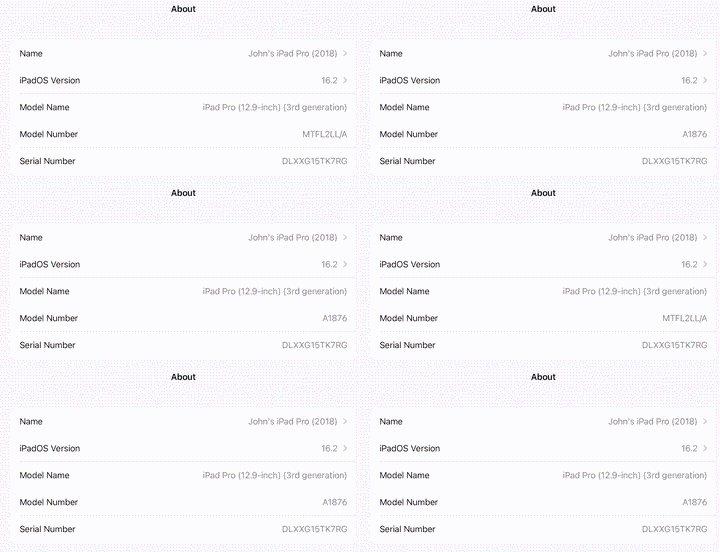
Identifying your iPad Using "About iPad"
An alternative way to find out which iPad you have is by using the
Open Settings, tap General, then tap About. Look for the model number in
the top section. If the number you see has a slash "/", that's the part
number (for example, MY3K2LL/A). Tap the part number to reveal the
model number, which has a letter followed by four numbers and no slash
(for example, A2342).